In this tutorial, you will learn how to write a Java program to add two numbers. This is one of the basic program which helps to understand the basic concepts of java programming. We will do it in three different ways:
- In the first program, we have the two numbers we just write the logic to add the given values.
- In the second program, user is asked to enter the two numbers and the program calculates the sum of the input values.
- In the third program, we will calculate the sum of two non-integer numbers.
Example 1: Sum of two numbers
This is a simple example, where two integer numbers are given. We have stored the given numbers in two int variables num1 and num2. The calculated sum of these values would be stored in third int variable sum.
public class JavaExample {
  public static void main(String[] args) {
    // two integer variables with values
    // and a variable "sum" to store the result
    int num1 = 5, num2 = 15,sum;

    //calculating the sum of num1 and num2 and
    //storing the result in the variable sum
    sum = num1+num2;

    //printing the result
    System.out.println("Sum of "+num1+" and "+num2+" is: "+sum);
  }
}
Output:
Sum of 5 and 15 is: 20
Example 2: Sum of two numbers using Scanner
The Scanner class provides the methods that allows us to read the user input. The values entered by user is read using Scanner class and stored in two variables num1 and num2. The program then calculates the sum of input numbers and displays it.
import java.util.Scanner;
public class AddTwoNumbers2 {

    public static void main(String[] args) {

        int num1, num2, sum;
        Scanner sc = new Scanner(System.in);
        System.out.println("Enter First Number: ");
        num1 = sc.nextInt();

        System.out.println("Enter Second Number: ");
        num2 = sc.nextInt();

        sc.close();
        sum = num1 + num2;
        System.out.println("Sum of these numbers: "+sum);
    }
}
In this program, the statement Scanner sc = new Scanner(System.in); creates an instance of Scanner class. This instance calls nextInt() method to read the number entered by user. The read values are stored in variables num1 and num2. Once the values are stored in variables. The addition is performed on these variables and result is displayed.
Output:
Enter First Number:
121
Enter Second Number:
19
Sum of these numbers: 140
Example 3: Program to add two non-integer numbers
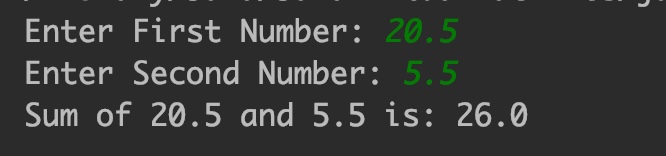
In previous examples, we have added integer numbers. In this example we are going to add float numbers such as 10.5, 16.667 etc.
Note: Variables data types is double unlike previous examples where data type was int.
import java.util.Scanner;
public class JavaExample {

  public static void main(String[] args) {

    double num1, num2, sum;
    Scanner sc = new Scanner(System.in);
    System.out.print("Enter First Number: ");
    num1 = sc.nextDouble();

    System.out.print("Enter Second Number: ");
    num2 = sc.nextDouble();

    sc.close();
    sum = num1 + num2;
    System.out.println("Sum of "+num1+" and "+num2+" is: "+sum);
  }
}
Output:
Practice the same program in C language here.
Leave a Reply